Category: Uncategorized

  • Beginner 3D printers: the “it just works” era is finally here

    Beginner 3D printers: the “it just works” era is finally here

    You no longer need an engineering degree to print a Baby Yoda. A few years ago, 3D printing was a hobby defined by troubleshooting: leveling beds with sheets of paper, unclogging nozzles, and tightening belts. In 2026, the technology has finally matured into an “appliance” phase.

    Modern beginner printers now calibrate themselves. They use sensors to map the print bed, adjust the nozzle height automatically, and even compensate for vibration to ensure smooth walls. If you are looking to get into the hobby, do not accept a machine that requires manual tinkering.

    The “no-brainer” pick

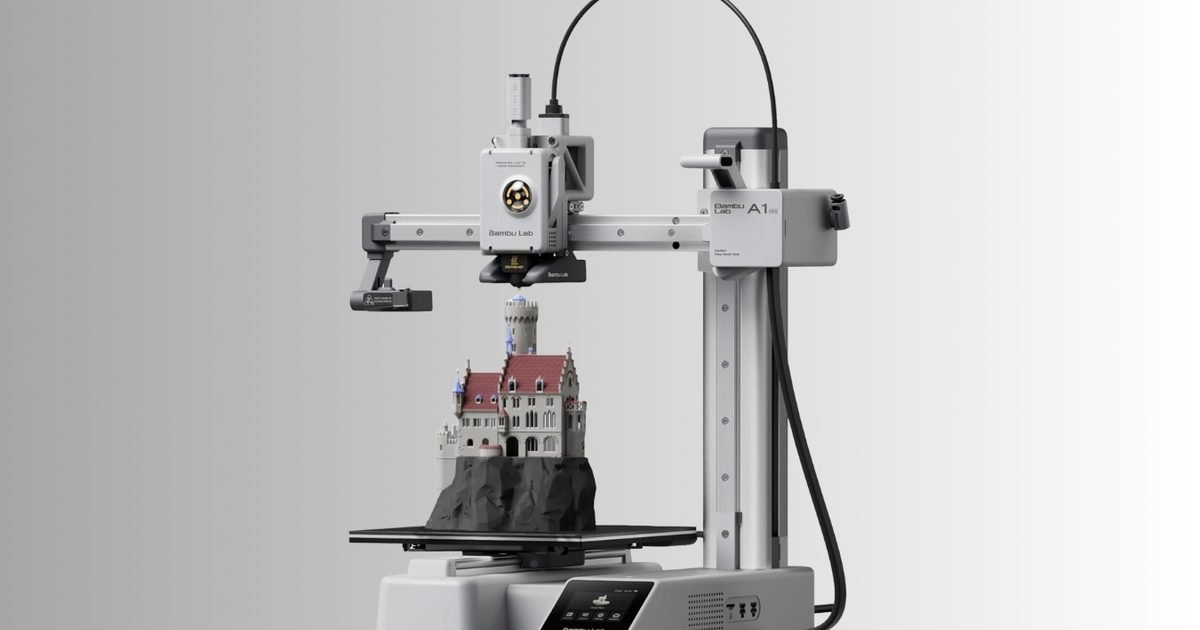
    Bambu Lab A1 Mini

    This printer effectively killed the “budget tinkerer” category. The Bambu Lab A1 Mini offers the reliability of a $1,000 machine for a fraction of the price. It performs a full self-calibration suite (vibration compensation, bed leveling, Z-offset) before every single print, ensuring the first layer is perfect without you touching a thing.

    • Why buy it: It is whisper quiet (<48dB), fast, and supports a multi-color upgrade (AMS Lite) if you want to print models with up to 4 colors later on.
    • Best for: The true novice who wants to print, not fix a printer.

    The budget workhorse

    Creality Ender 3 V3 SE

    The “Ender 3” name is legendary in the community, but the V3 SE is the first iteration that is truly beginner-friendly. Unlike its predecessors, it takes about 20 minutes to assemble and features CR Touch auto-leveling and a strain sensor for auto Z-offset. It uses a “Sprite” direct drive extruder, which handles flexible filaments (like TPU) much better than older Bowden tube designs.

    • Why buy it: You get a standard full-size build volume (220x220x250mm) for the same price as the smaller A1 Mini.
    • Best for: Someone who needs a larger print area but wants to stay near the $200 mark.

    The feature-rich middle ground

    ELEGOO Neptune 3 Pro

    Elegoo has built a reputation for incredible value, and the Neptune 3 Pro is their standout FDM machine. It features a segmented heat bed that saves energy when printing small parts and dual lead screws for the Z-axis, which provides better stability than the single screw found on cheaper models. The removable touchscreen is intuitive, and the PEI magnetic sheet makes removing prints satisfyingly easy.

    • Why buy it: It feels more “premium” than the Ender series, with better cable management and a sturdier frame.
    • Best for: The user who wants a reliable, quiet workhorse for functional parts.

    The resin pick (for miniatures)

    ELEGOO Mars 5 Ultra

    If your goal is to print D&D miniatures or jewelry, standard plastic (FDM) printers won’t capture the fine details. You need resin. The Mars 5 Ultra solves the biggest pain point of resin printing: leveling. It features smart automatic leveling and intelligent detection that can pause the print if it detects a failure or lack of resin.

    • Why buy it: The 9K resolution screen produces prints so smooth you can barely see the layer lines. It is currently 14% off.
    • Best for: Gamers, model painters, and jewelry makers. (Note: Resin requires ventilation and gloves).

    The “buy once, cry once” upgrade

    Bambu Lab P1S

    If you have a flexible budget, this is the printer you will likely eventually upgrade to anyway. The P1S is a CoreXY machine, meaning it is significantly faster than the others on this list (up to 500mm/s). It is fully enclosed, making it safer for homes with pets and capable of printing advanced temperature-sensitive materials like ABS or ASA.

    • Why buy it: It is a “set it and forget it” machine that can grow with you from beginner to expert. It is currently seeing a massive 36% discount, dropping it to $449.
    • Best for: Beginners who want the best consumer experience available today.
  • Amazon is turning to AI to cut film and TV production costs

    Amazon is turning to AI to cut film and TV production costs

    Amazon is moving to bring artificial intelligence deeper into the way movies and TV shows are made, aiming to speed up production and reduce costs at its MGM Studio unit. The company plans to use AI tools across the creative process, even as Hollywood remains cautious of the technology’s potential impact on jobs and industry practices.

    According to Reuters, Albert Cheng is leading a small team at what Amazon calls its “AI Studio,” focused on building proprietary tools to streamline everything from pre-production planning to post-production editing. In an interview, Cheng said the main goal of the AI Studio is to cut costs and improve creative workflows, while keeping writers, directors, actors, and other creative professionals involved at every step.

    Amazon plans to invite industry partners to test its AI tools in a closed beta program in March, with initial results expected by May. The company is reportedly relying on its cloud computing division, Amazon Web Services, for assistance and plans to work with multiple large language model providers to give creators a range of tools for pre- and post-production filmmaking.

    Company assures AI will not replace creative talent

    Amazon says it is not trying to replace humans with AI, and that creative decisions will remain in human hands even as the tools automate more technical work. The initiative comes as production costs have risen sharply, making it harder for studios to finance large projects.

    The AI Studio is collaborating with producer Robert Stromberg and his company Secret City, actor-producer Kunal Nayyar and his Good Karma Productions, and former Pixar and ILM animator Colin Brady as it tests new tools and explores the best ways to integrate them into production.

  • This app wants you to doomscroll interactive media instead of viral videos

    This app wants you to doomscroll interactive media instead of viral videos

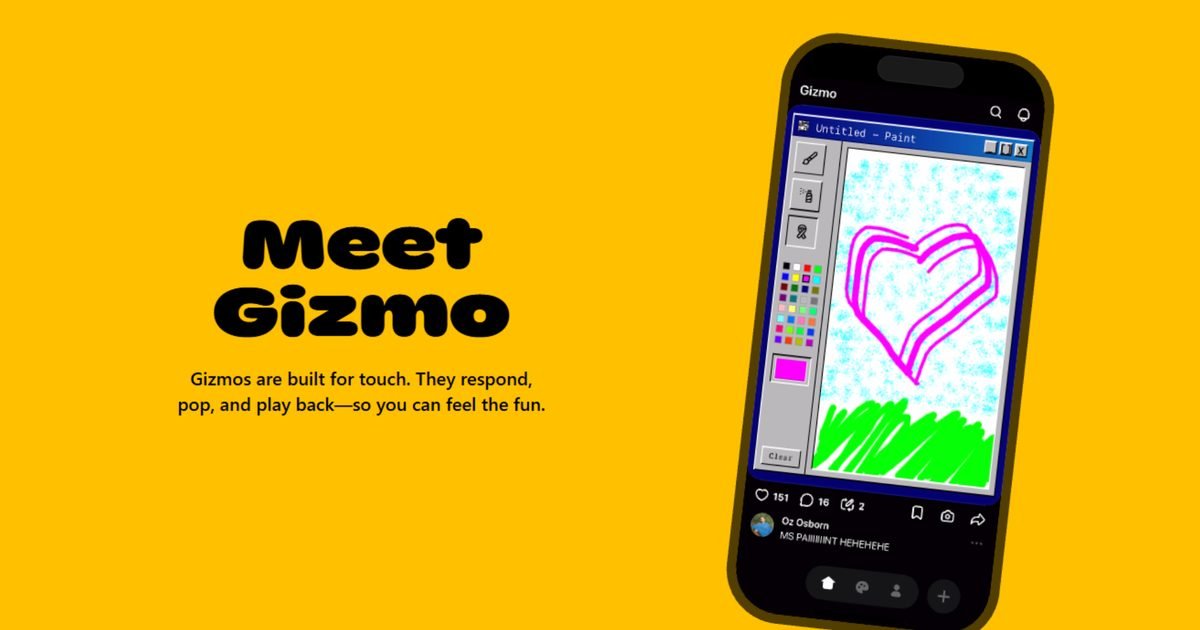
    New York-based startup Atma Sciences is rethinking doomscrolling with a new app called Gizmo that swaps viral videos for a TikTok-style feed of interactive, vibe-coded mini apps. Instead of passively watching short clips, Gizmo lets users scroll through fun AI-generated experiences they can actively engage with.

    Each swipe drops users into a different interactive experience, ranging from simple games and quizzes to reactive memes and visual experiments. According to TechCrunch, these mini apps are generated using natural language prompts, with Gizmo’s built-in AI handling the underlying code and design, allowing anyone to create and publish interactive content without technical skills.

    Users can interact with these Gizmos while scrolling through their feeds and even remix existing Gizmos to create their own version. The remix feature encourages rapid experimentation, with users building on each other’s ideas rather than starting from scratch. This results in a feed that feels less polished than traditional social platforms, surfacing half-baked concepts alongside surprisingly refined experiences.

    Gizmo is available for free on Android and iOS

    Gizmo arrives at a time when short-form video platforms continue to dominate user attention, but its unique format has already gained early traction. Since its launch six months ago, it has reportedly garnered around 600,000 installs. Gizmo is available for free on both iOS and Android, with its app store listing stating that it will remain free “without limits or hidden costs.”

    In an FAQ section on its website, Atma Sciences says Gizmo is designed as a social platform for interactive content, with built-in discovery and sharing tools that encourage users to explore and remix creations from others. The company adds that it relies on a mix of automated systems and human oversight to review Gizmos as they are created and remixed “to maintain a positive community.”

  • Spotify will soon let you buy paper books inside the app

    Spotify will soon let you buy paper books inside the app

    Spotify is expanding beyond streaming music and audiobooks to bring physical books into its app. The company has announced a partnership with Bookshop.org that will let users buy real paper books directly through Spotify later this spring. The move comes as Spotify looks to give users more ways to discover and enjoy stories, tying together reading and listening in one place.

    Spotify’s new partnership with Bookshop.org connects the streaming platform to a network of independent bookshops, making it possible for users in the US and UK to purchase hardcovers and paperbacks without leaving the Spotify app.

    How the Bookshop partnership works

    Bookshop.org will handle pricing, inventory, and fulfillment, while readers are directed to the retailer to complete the purchase. With physical books still accounting for a large share of reading habits, Spotify sees this as a way to support both readers and local bookstores while giving authors a broader audience.

    The partnership builds on Spotify’s growing audiobook presence, which it introduced in 2022 and has since expanded across more than 22 global markets with hundreds of thousands of English-language titles.

    By adding physical books to its ecosystem, Spotify aims to help readers more easily go from discovering a book in the app to owning a printed copy. Bookshop.org’s founder and CEO Andy Hunter said he welcomes the collaboration, noting that it could amplify support for independent booksellers by meeting readers where they already spend time.

    For a company best known for music streaming, this move marks a notable shift toward becoming a more holistic audio and reading destination. Alongside the Bookshop partnership, Spotify has also announced its new Page Match feature, which lets readers sync audiobooks with physical books. Just yesterday, the streaming giant also rolled out offline lyrics with translation support as part of a broader wave of product updates.

  • Why NVIDIA RTX PCs offer the best way to run AI locally

    Why NVIDIA RTX PCs offer the best way to run AI locally

    NVIDIA’s RTX AI PCs deliver data center–level AI performance to desktops, giving enthusiasts, creators and developers the power to run advanced models locally, faster, and with greater control

    AI has become part of everyday computing, through cloud-hosted chatbots and online services, and now directly on personal computers. From creative tools and productivity assistants to developer workflows and research projects, people increasingly want to run AI applications locally – on their own machines and on their own terms.

    As this trend accelerates, the focus is shifting from what AI can do to where it runs best. For users who prioritize performance, privacy, cost and flexibility, the underlying hardware has become more important than ever. AI models are resource-intensive and running them well requires significant compute power.

    NVIDIA’s RTX AI PCs are designed specifically for this workload. Powered by NVIDIA GeForce RTX GPUs, these PCs bring the same foundational technologies used in leading AI data centers to desktops and laptops, offering the performance, software support and efficiency required for modern AI workloads.

    Who wants to run AI on their PCs today?

    As AI becomes more deeply embedded in everyday workflows, reliance on always-on cloud services is giving way to a preference for fast, private, and controllable AI that runs directly on the PC.

    The audience for local AI is broader than many people realize, with three distinct groups driving demand, each for different reasons.

    Productivity-focused users  are a key group turning to AI assistants. These individuals want tools that can summarize documents, search across local files, and provide contextual insights based on their own data. For these users, AI is a tool for streamlining everyday tasks, and that often means keeping their data local.

    Another group consists of creators. Artists, designers and video editors are adopting AI. Tools like diffusion models in ComfyUI, AI-assisted video editing, and 3D generation help automate repetitive tasks, speed up the creative process and unlock new approaches – all while allowing users to stay within familiar applications.

    The third group comprises developers, including students, hobbyists, independent engineers and researchers. As AI capabilities continue to expand, developers need hardware that allows them to build, test, fine-tune and optimize models locally. Relying on cloud resources or incurring per-use costs can hinder experimentation and slow down innovation.

    Despite their differences, all three groups share a common requirement for reliable local performance without dependency on the cloud.

    Why run AI locally instead of in the cloud?

    Cloud-based AI certainly has its advantages, but it isn’t always the best solution for every situation. Running AI locally addresses several practical concerns that become increasingly important as AI moves from experimentation to everyday use.

    Privacy is one of the most immediate drivers. Cloud models typically log prompts and outputs, often retaining this data for analysis or training. For users working with sensitive files, personal data, or proprietary projects, using AI locally on their PC provides peace of mind.

    Context is another limitation of cloud AI. Models that lack access to a user’s local files, datasets, or project structures may produce generic or even incorrect responses. In contrast, local models can work directly with folders, codebases and documents, resulting in more accurate and relevant answers.

    Cost also becomes a significant factor as AI usage scales. Many creative and development workflows rely on constant iteration – regenerating images, refining prompts, running repeated inference passes or testing model variations. Cloud usage fees can accumulate quickly in these scenarios, whereas running AI locally allows users to iterate freely without incurring per-request costs or facing usage caps.

    Control and security are becoming crucial, too, as AI agents grow more capable. New AI tools can take actions within a user’s system, such as modifying files, running scripts or automating workflows. Many users prefer to keep this level of autonomy local, allowing them to maintain full control.

    The trade-off, of course, is that modern AI models are demanding. They require significant compute power, efficient memory usage, and hardware that can keep pace with rapidly evolving software ecosystems.

    What makes RTX different

    At the heart of RTX GPUs are dedicated Tensor Cores, specifically designed to accelerate AI workloads. Unlike CPUs or general-purpose graphics hardware, Tensor Cores are optimized for the matrix operations that underpin modern AI.

    In practice, this means dramatically faster performance for tasks such as image generation, video enhancement and large language model (LLM) inference. Workloads that can take several minutes or be impractical on CPU-only systems can run efficiently on RTX GPUs.

    This advantage is especially clear in visual AI. For example, generating a video clip on an RTX GPU can take just a couple of minutes, while similar tasks on non-accelerated platforms can be five to ten times slower depending on workload and configuration. RTX GPUs also support advanced precision formats such as FP4, helping reduce memory requirements while increasing throughput for AI inference.

    The AI software ecosystem advantage

    Hardware performance means nothing if the software doesn’t support it. AI moves quickly, and access to the latest tools and frameworks is essential.

    The same CUDA ecosystem that underpins AI development in the cloud also enables these experiences on RTX AI PCs. As a result, new models and optimisations typically arrive first on NVIDIA platforms and are often already tuned by the community.

    Popular tools such as Ollama and Llama.cpp for LLMs, ComfyUI and PyTorch for diffusion models, and Unsloth for fine-tuning are all optimised for RTX GPUs, as NVIDIA works directly with these partners to ensure their software runs efficiently on RTX hardware.

    NVIDIA also works directly with Microsoft to accelerate native AI through Windows ML, using NVIDIA’s TensorRT Execution Provider to deliver seamless, high-performance inference across all supported applications.

    For developers and enthusiasts alike, these partnerships mean less time spent on compatibility issues and more time to experiment with the latest models.

    Smarter use of VRAM for larger models

    As models grow in size and capability, memory can become a limiting factor. Running advanced models locally can quickly consume all available VRAM. However, NVIDIA has been at the forefront of supporting reduced-precision formats such as FP8 and FP4. These formats can decrease VRAM consumption by approximately 50 and 70 per cent, respectively, without significantly compromising accuracy for many inference workloads. When combined with other memory-optimisation techniques, this makes it possible to run state-of-the-art models locally on consumer-grade hardware.

    For creators and developers, this means more flexibility, enabling the use of larger models, higher resolutions and more complex workflows without the need for workstation-class systems.

    AI acceleration in everyday applications

    As models grow in size and capability, memory can become a limiting factor. Running advanced models locally can quickly consume all available VRAM. However, NVIDIA has been at the forefront of supporting reduced-precision formats such as FP8 and FP4. These formats can decrease VRAM consumption by approximately 50 and 70 per cent, respectively, without significantly compromising accuracy for many inference workloads. When combined with other memory-optimisation techniques, this makes it possible to run state-of-the-art models locally on consumer-grade hardware.

    For creators and developers, this means more flexibility, enabling the use of larger models, higher resolutions and more complex workflows without the need for workstation-class systems.

    The NVIDIA RTX AI PC advantage

    As AI becomes more of a utility, where it runs starts to matter. Cloud AI isn’t going anywhere, but the assumption that all AI needs to live in distant data centers is breaking down. For anyone who cares about privacy, wants unlimited iteration, or needs AI that understands their local context, running models on local hardware makes sense.

    RTX AI PCs are NVIDIA’s answer to that shift: consumer hardware with enough power to run serious AI workloads locally, backed by the software ecosystem that makes it practical. Whether you’re a designer automating repetitive tasks, a developer testing model variations, or someone who just wants AI that respects your privacy, the appeal is clear.

    The era of AI PCs has arrived. The question is whether your hardware is ready for it.
  • Spotify’s new Page Match feature can now sync your audiobooks with physical books

    Spotify’s new Page Match feature can now sync your audiobooks with physical books

    Spotify has launched a new feature called Page Match that lets readers move seamlessly between a physical or ebook and its audiobook. This feature builds upon the existing audiobook Recaps feature, which gives a quick audio summary to pick up from the section where you left off.

    Page Match aims to solve a familiar frustration for readers who like to switch formats but keep losing track of the last page they read. Now, you can pick up a book, scan a page, and Spotify takes you straight to the matching moment in the audiobook.

    How Spotify’s Page Match feature works

    To use Page Match, open the Spotify mobile app and search for the book you are currently reading. Inside the audiobook listing, you tap the Page Match button, which activates your phone’s camera.

    You then scan a page from your physical book, and Spotify analyzes the text on that page and matches it to the same section in the audiobook, starting playback from the correct spot.

    The feature also works in reverse. If you have been listening to an audiobook and want to switch back to reading, Page Match can guide you to the exact page where you left off. In practice, matching a page to the audiobook is fairly straightforward. However, switching back from audio to print can be trickier.

    Early use by The Verge shows that finding the exact page from audio is not always smooth, especially if editions differ. In some cases, it can mean flipping back and forth through pages and overshooting the right spot before settling in.

    Even with those rough edges, Page Match highlights Spotify’s effort to make audiobooks feel more connected to traditional reading, especially for people who regularly move between formats throughout the day.

    The music streaming giant has been rolling out a steady stream of updates lately to improve user experience. Just yesterday, Spotify announced offline lyrics with translation support and it has also been leaning on AI to reshape how podcast discovery works on the platform. With Page Match now joining the list, Spotify feels more intuitive across music, podcasts and books.

  • Anthropic is betting on ad-free Claude to win you over from ChatGPT

    Anthropic is betting on ad-free Claude to win you over from ChatGPT

    Anthropic has taken a very public shot at ads in AI chatbots, pledging that its assistant Claude will stay free of advertising even as rivals move in the opposite direction. The company says it has no plans to introduce sponsored content, branded responses, or advertiser-influenced answers, positioning the decision as a core principle rather than a temporary choice.

    The announcement arrives just weeks after OpenAI confirmed that ads will soon appear in ChatGPT for free users and those on the lower-priced Go tier. Anthropic’s response has been anything but subtle. Alongside a detailed blog post, the company has debuted Super Bowl commercials that mock AI assistants interrupting users with awkward ad placements mid-conversation.

    According to Anthropic, advertising creates incentives that are fundamentally misaligned with how an AI assistant should behave. In its view, a system designed to sell products, even indirectly, risks nudging responses toward commercial outcomes rather than prioritizing what is most useful for the user. The company points to scenarios like health and wellness queries, where users expect neutral advice rather than suggestions shaped by sponsorships. It also argues that ads would be distracting for people using Claude as a work tool.

    Claude will remain ad-free, at least for now

    Despite the firm messaging, Anthropic stops short of making an absolute commitment. The company acknowledges that while Claude is ad-free today, it may revisit the approach in the future, promising to be transparent if that happens. This caveat is notable given how strongly Anthropic is currently marketing its anti-ad stance.

    None of Anthropic’s ads mention OpenAI or ChatGPT by name, but the target is obvious. Whether this is enough to influence users to switch from ChatGPT to Claude for an ad-free experience remains to be seen.

  • Galaxy S21 support is winding down, what it means for your security updates

    Galaxy S21 support is winding down, what it means for your security updates

    Samsung just changed the outlook for Galaxy S21 security updates. Its published security update pages no longer place the Galaxy S21, S21 Plus, or S21 Ultra on the monthly or quarterly tracks, which is a strong sign the phones are no longer in the standard patch cycle.

    Nothing breaks overnight. But you should stop assuming a fresh patch is coming on a predictable schedule, especially if you use banking apps, store two factor codes, or sign into work accounts on your phone.

    The timing fits the S21’s original roadmap. The lineup launched in 2021 and has already received the four major Android OS upgrades it was promised, including Android 15 with One UI 7 in the first half of 2025. The report also notes the last regular security patch arrived late last year.

    The S21 is off the standard track

    The biggest shift is expectation. Phones on a monthly list get steady security maintenance. Phones on neither list move into a watch-and-wait phase, where fixes are more likely to land only when a serious issue forces the issue.

    That can be easy to ignore because your S21 will feel the same day to day. Still, leaving the schedule usually means longer gaps between the quiet fixes that reduce exposure over time.

    Why this matters for your daily use

    For most owners, the downside is uncertainty. If you handle payments, store sensitive files, or rely on your phone for work logins, longer gaps between patches raise the stakes for basic account hygiene, good passwords, app updates, and careful permissions.

    It also clears up a common assumption. Samsung’s newer seven-year update policy starts with the Galaxy S24 series, so it doesn’t extend the S21’s support window.

    Your next move if you keep it

    If you’re keeping your S21, make sure you’re on the latest update available today, then tighten the basics that limit damage from account takeovers. Use a strong screen lock, keep apps updated, and remove anything you don’t use anymore. Do it now.

    If you’re thinking about upgrading, you don’t need to panic buy a new flagship. Match the move to your usage, check out the best Samsung phones out now. Heavy account and work access favors a newer phone with a predictable patch track. Lighter use buys you time if you stay disciplined and check Samsung’s update pages periodically.

  • Samsung Galaxy S26 might give you a freakishly fast AI image trick that works offline

    Samsung Galaxy S26 might give you a freakishly fast AI image trick that works offline

    Samsung’s next Galaxy S phone could get a new AI feature that’s built for speed. A post from leaker Ice Universe claims the Galaxy S26 will add EdgeFusion, an on-device text-to-image tool that can spit out results in under a second, even offline.

    If it ships that way, Galaxy S26 offline AI image generation becomes a lot more practical. You type a prompt, the phone creates an image locally, and you’re not waiting on a server or a strong signal. It’s the difference between a novelty and something you might actually use.

    The same post links EdgeFusion to a partnership with South Korea-based AI company Nota. Samsung hasn’t confirmed any of this, and there’s still no word on regions, model tiers, or whether it would be limited at launch.

    Samsung Electronics of South Korea has partnered with local AI company Nota to develop a new AI feature called EdgeFusion. This feature can generate images directly on the device in under one second based on text prompts entered by the user.

    Samsung plans to integrate EdgeFusion…

    — Ice Universe (@UniverseIce) February 5, 2026

    Speed is the headline feature

    The under-one-second claim is the hook, and it’s also the part Samsung will have to prove. Real-world performance usually varies by prompt complexity, image size, and what else the phone is doing. That said, even getting close to “instant” would change how often people reach for the tool.

    Running it on the device also hints at a bigger shift, more AI work handled by the handset instead of offloading tasks to cloud processing.

    Offline changes the way you use it

    A local generator has obvious uses, quick sticker ideas, rough concept art for a slide, or a visual to drop into a message. But the bigger win is reliability. If you’re traveling, commuting, or dealing with weak coverage, it still works.

    The unknowns are the usual ones. On-device image tools can heat up a phone, drain battery, and deliver lower quality than larger cloud models. The post doesn’t mention output resolution, usage limits, or whether only the top model gets full performance.

    What to watch before you upgrade

    The next clues are how Samsung positions the tradeoffs. Look for talk of NPU gains, thermal controls, and battery safeguards, plus clear limits around quality and speed.

    Integration will matter too. If EdgeFusion is buried in a separate app, it won’t stick. If it shows up inside messaging, Notes, or photo editing, it could become a daily tool. Until Samsung confirms support and rollout timing, it’s smart to treat this as a promising rumor, not an upgrade reason on its own.

  • The Steam Machine may cost you more as Valve rethinks pricing amid the memory shortage

    The Steam Machine may cost you more as Valve rethinks pricing amid the memory shortage

    Shortly after unveiling the Steam Machine last November, Valve made it clear that the device would not be priced to compete with consoles like the Xbox or PlayStation. While exact figures were not shared, the company said the Steam Machine would be priced in line with a PC featuring similar hardware. Now, ahead of the launch, Valve says that pricing could be adjusted further due to the ongoing memory shortage.

    The Steam Machine was previously estimated to cost between $500 and $1,000 based on its specifications and configuration. However, it may now launch with a higher price tag. In a recent blog post, Valve said it had initially intended to share pricing and availability details by this point. Due to continued shortages affecting memory and storage, the company says it must now “revisit” both the shipping schedule and pricing for the Steam Machine and Steam Frame.

    Valve added that its target of shipping the devices in the first half of 2026 remains unchanged, but it still has “work to do to land on concrete pricing and launch dates.” Alongside this update, the company also published a set of FAQs covering various aspects of its upcoming hardware.

    Valve reiterates Steam Machine performance and upgrade options

    According to Valve, the Steam Machine will be capable of running most Steam games at 4K resolution at 60fps using AMD FSR, though more demanding titles may require lower frame rates with VRR enabled or a reduced resolution of 1080p. The company also confirmed that both the SSD and RAM will be user-accessible and upgradeable. In addition, Valve plans to share faceplate CAD models in the coming months to help third-party manufacturers develop custom faceplates for the Steam Machine.

    For now, prospective buyers will have to wait for an official announcement to know exactly how much the Steam Machine will cost or when it will go on sale. The company has said it will share more updates as soon as possible.