Google set Google I/O 2026 for May 19 to 20, and it’s making AI the headline from the start. The company’s save the date messaging puts Gemini front and center, with Android, Chrome, and Google Cloud called out as the core places those updates should land.
If you’re watching Google I/O 2026 AI announcements to guide product choices, the real news is in the framing. Google is treating AI not as a side stage topic, but it’s positioning model upgrades and developer tools as the throughline that connects the rest of the platform story. That should shape how you budget attention once the schedule drops.
Google also confirmed the basics, it’ll be hosted at Shoreline Amphitheatre in Mountain View, with online viewing available, and registration is open. What’s missing is the stuff developers actually plan around, session titles, talk tracks, workshop details, and any clarity on in person attendance limits.
Gemini is the early tell
Google’s first hints are blunt. It talks about AI updates alongside Gemini, then immediately ties that to the surfaces where apps ship and scale. Expect the keynotes to set direction, then the sessions to explain what’s new in tooling, SDKs, and how AI features plug into existing workflows, where the useful details usually hide.
Google’s developer channels also leaned on the I/O “solve,” with shoutouts to community builds and remixes. That’s a small signal, but it suggests Google wants experimentation before the main event, not just passive viewing. It also hints that hands on demos, templates, and guided builds may get more emphasis this year.
What to do before May
Register now, then treat the event site like a feed. The interactive I/O puzzle built with Gemini is worth checking, because it signals the kind of developer experiences Google wants people to try. When session lists appear, prioritize talks that sound like implementation, APIs, evaluation, safety, deployment, and monitoring. Those are the sessions that turn broad AI talk into shipping plans.
Hyderabad: Ahead of the holy month of Ramzan, the Greater Hyderabad Municipal Corporation (GHMC) has intensified cleanliness drive near Charminar.
On Wednesday, February 18, GHMC Commissioner RV Karnan inspected the areas surrounding the historical monument.
Review by GHMC Commissioner
During the visit, he reviewed ongoing cleaning activities at Mecca Masjid, Madina and nearby locations. These areas witness large public gatherings during Ramzan.
Officials were instructed to ensure that roads and junctions remain clean during the holy month.
During the inspection, Additional Commissioner (Sanitation) Ravi Kiran and Charminar Zonal Commissioner Srinivas Reddy accompanied with the GHMC Commissioner.
Ramzan crescent moon sighting committee meeting in Hyderabad
Meanwhile, the Central Ruet-e-Hilal Committee of Sadar Majlis-e-Ulama-e-Deccan, also known as the Moon Sighting Committee, is scheduled to convene its monthly meeting on Wednesday, February 18, at 6:00 pm to determine the start date of Ramzan in India based on sighting of crescent moon.
The meeting will be held at Hussaini Building, Moazzam Jahi Market. It will be led by Hazrat Maulana Syed Hassan Ibrahim Hussaini Qadri Sajjad Pasha, Secretary of Sadar Majlis Ulema Deccan.
Meanwhile, many business establishments and restaurants in Hyderabad and other cities in India have completed their preparations for Ramzan.
Get the latest updates in Hyderabad City News, Technology, Entertainment, Sports, Politics and Top Stories on WhatsApp & Telegram by subscribing to our channels. You can also download our app for Android and iOS.
Orbiting 250 miles above Earth, the views from the International Space Station (ISS) are second to none, and always make a huge impact on astronauts lucky enough to stay there.
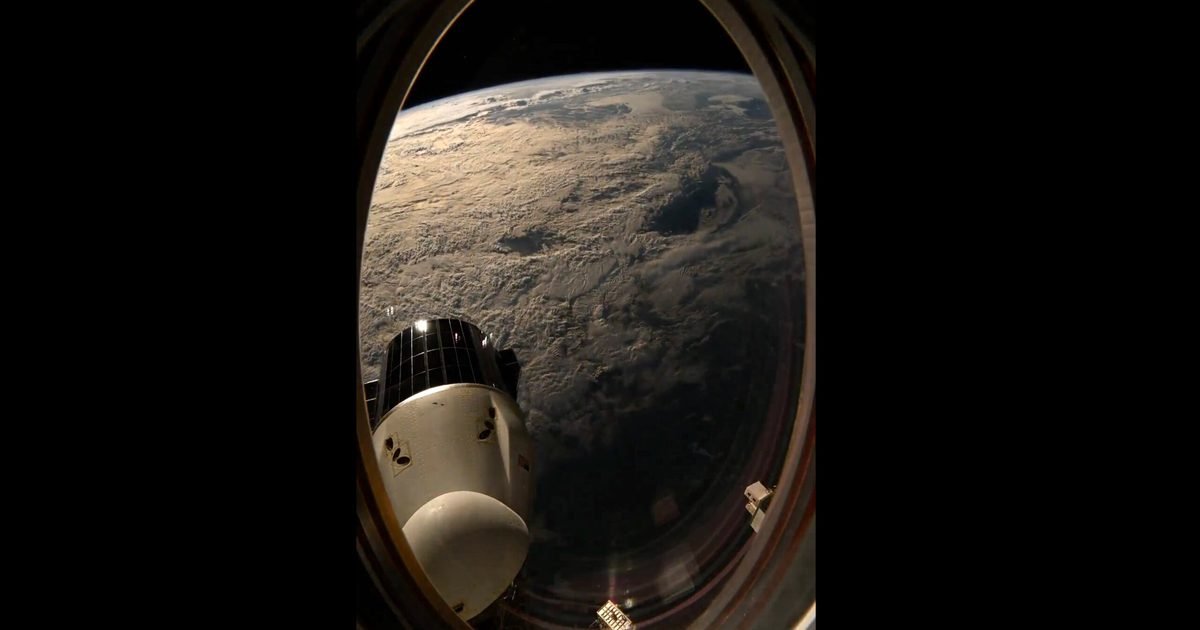
NASA’s Zena Cardman, who returned form the ISS in January after a visit lasting just over five months, this week shared a gorgeous time lapse (below) showing “a little of everything,” including sunset, lightning storms, air glow, moon glint, stars, and sunrise, and even a docked Dragon spacecraft bathing in the ever-changing light.
“The space station rarely makes big changes to its orientation, but we were lucky to experience such maneuvers (flipping around to fly butt-first, then flipping back again) before and after each CRS-33 reboost,” Cardman wrote in her post, referring to how the station is occasionally nudged to a higher orbit by a docked spacecraft to counteract atmospheric drag that gradually lowers its altitude.
“This 60x speed time lapse was one of my favorites since it captures a little of everything — sunset, lightning storms, air glow, moon glint, stars, and sunrise — as we did one (actually very slow) orbital cartwheel from Atlantic to Pacific.”
The @Space_Station rarely makes big changes to its orientation, but we were lucky to experience such maneuvers (flipping around to fly butt-first, then flipping back again) before and after each @spacex CRS-33 reboost. This 60x speed timelapse was one of my favorites since it… pic.twitter.com/7IsZnb1G7G
The station is orbiting Earth at about 17,500 mph (28,000 kph), circling the planet around 16 times in every 24-hour period. That means astronauts aboard the ISS get to experience 16 sunsets and 16 sunrises during that period.
Whether light or dark, many astronauts like to head to the seven-window Cupola during their time off, grabbing a camera to get some shots of Earth or set up a time lapse.
French astronaut Thomas Pesquet even published a book showcasing his impressive work. Pesquet planned his time aboard the ISS carefully, taking breaks from science work when he knew the station would be passing over a visually striking part of Earth. Camera in hand, the astronaut would capture breathtaking shots before sharing them on social media.
American astronaut Don Pettit has also earned a reputation for his stunning visual work captured aboard the ISS, with some of his more surreal images also receiving much praise.
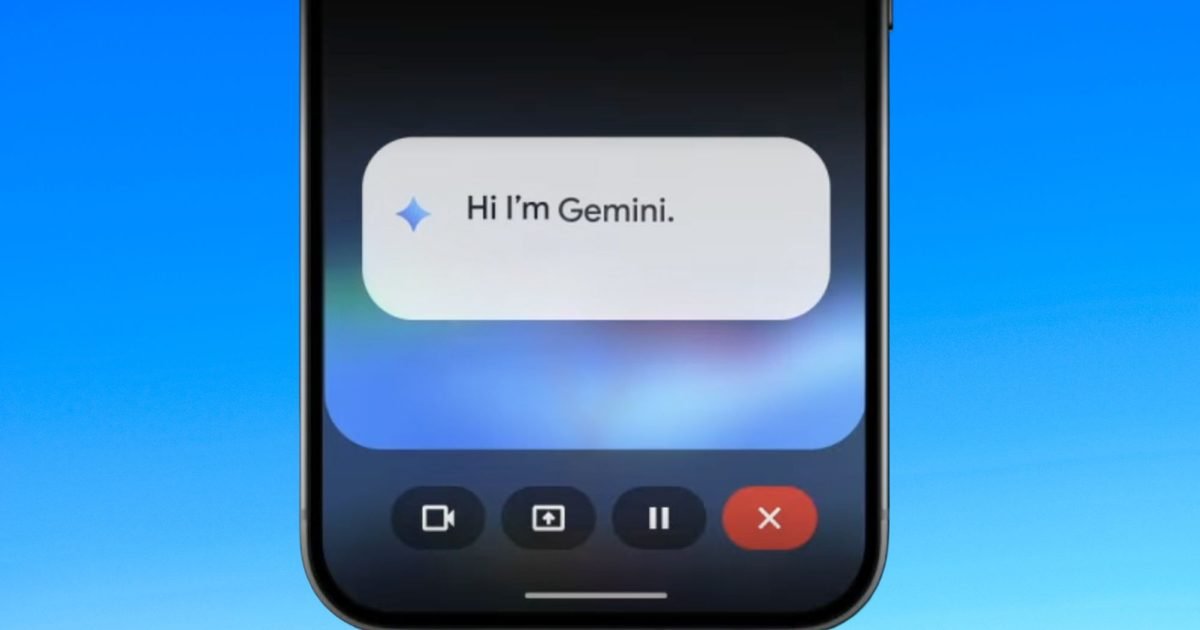
Google is rolling out a major update to its Gemini AI platform that changes how mobile users interact with artificial intelligence on Android devices. With its latest enhancement, Gemini can now operate in split-screen mode alongside other apps, allowing the AI assistant to work in context with what’s on your phone screen – without forcing you to switch between apps.
Bringing AI into your workflow
Traditionally, AI assistants on smartphones have existed in separate interfaces: you open a chat window, ask a question, then switch back to your app of choice once you’ve received an answer. Google’s new split-screen implementation breaks that pattern. Now, Gemini can appear alongside another app in a dedicated pane, actively assisting you as you work.
For example, while composing an email or message, Gemini can suggest phrasing, refine text, or draft replies in real time. If you’re reading a long article or document in a browser, the AI can pull out key points or summaries without interrupting your reading flow. In messaging apps, users can ask Gemini to help with reply suggestions or generate quick responses based on the conversation visible on the screen.
Gemini on a smartphoneUnsplash
This update is part of Google’s broader effort to make its AI tools more assistive – not just reactive. Instead of waiting for a user to ask a question, Gemini can now be a contextual partner that actively contributes to your tasks.
Already rolling out to select Android devices and compatible apps, the split-screen feature shows up as an option to “open Gemini” alongside supported applications. Once activated, the AI pane remains visible and interactive while the primary app stays in view.
An important shift in mobile AI design
This move reflects a broader shift in how manufacturers and developers are thinking about artificial intelligence on mobile platforms. Instead of treating AI as a separate service that users dip into occasionally, companies like Google are moving toward AI-augmented multitasking, where generative intelligence becomes part of everyday mobile workflows.
Competitors such as Apple and Microsoft have also signaled interest in deeper AI integration into their respective operating systems. Microsoft is exploring AI tools within Windows apps, while Apple is preparing its on-device AI services in iOS. Google’s split-screen implementation represents one of the more advanced examples of contextual AI integration on Android so far.
For users, this evolution means less context switching. You no longer need to copy text from one app, open a separate AI interface, and paste it back – Gemini can be right there beside your content, understanding what you’re doing and suggesting enhancements on the fly.
The benefits may seem subtle at first glance, but they’re significant in practice
Streamlining tasks like drafting replies, summarizing long content, or generating ideas can save time and reduce friction in routine workflows. Students researching topics, professionals juggling communication, or casual users trying to extract insights from articles will find the new split-screen Gemini a practical addition.
Gemini Live is leagues ahead of Siri.Nadeem Sarwar / Digital Trends
Privacy-minded individuals will also appreciate that Gemini’s split-screen tools work within the context of their existing apps, rather than funneling data through separate windows or services.
What’s next for gemini and mobile AI
Google’s rollout is still in the early stages, and not all devices or apps support the split-screen feature yet. But the groundwork has been laid for even deeper integrations, where third-party apps might expose richer interfaces that Gemini can use to provide more tailored assistance. Developers could eventually allow Gemini access to app content in structured ways, similar to desktop AI plugins.
As AI becomes more embedded into operating systems, experiences like split-screen multitasking may soon become commonplace, blurring the line between app and assistant. Google’s latest move with Gemini hints at a future where your phone’s AI doesn’t just answer questions – it helps you get things done.
In what many users are calling the latest move in its ongoing battle against ad blockers, YouTube is increasingly displaying missing comments and sometimes even video descriptions for users who have ad-blocking software enabled on their browsers. The odd behaviour – comments sections replaced with a message stating “Comments are turned off” – has been reported across multiple devices and browsers, raising concerns about whether YouTube is intentionally stripping features for ad-block users.
How the experience is changing for viewers
Over the past week, viewers on forums such as Reddit and X have noticed that every video they load shows that comments are disabled, even on videos that normally have active discussions. In many cases, refreshing the page restores the comments, and in others, turning off an ad blocker brings back both comments and video descriptions that had been hidden. The widespread reports span browsers such as Chrome, Edge, Brave and more, with users quickly drawing links to the use of ad-blocking extensions.
Unsplash
For typical users, comments and descriptions aren’t just nice extras – they provide context, feedback and interaction with the community. Seeing them disappear alongside ad blockers has led many to suspect that YouTube may be experimenting with feature suppression as an indirect tactic to discourage ad blocker use.
This development follows a broader pattern of YouTube attempting to curtail ad blocking in various ways over the past few years. Past reports have documented YouTube experimenting with blocking video playback, slowing down content loading, or displaying in-platform messaging if an ad blocker is detected.
Why this matters beyond minor glitches
While feature bugs are common on large platforms, the scale and consistency of these reports – affecting tens of thousands of users across platforms – has led observers to view the behaviour as more than a simple bug. Comments and descriptions are core parts of the YouTube experience; their sudden disappearance undermines the platform’s role as a community space.
YouTube’s decision to hide dislikes has come under fire.Angie Yeoh/Shutterstock / YouTube
Users have reacted with frustration, noting that this trade-off – ads or lose key features – puts them in a difficult spot. For privacy-minded viewers who rely on ad blockers across the web, this creates a tension between wanting a clean, fast experience and accessing the full YouTube feature set.
Content creators are affected too. Comments are a primary engagement metric, used to gauge audience response and build community. If a significant portion of viewers can’t see or post comments due to ad blocker detection, creators may see meaningful dips in engagement and feedback loops.
How users are responding
At present, there’s no official confirmation from YouTube on whether the comment removal behaviour is intentional, a test, or simply a bug tied to recent frontend changes. In the meantime, users have identified a couple of workarounds: refreshing the video page or disabling ad-blocking extensions – both of which often restore full UI elements.
Some people have speculated that this could be another piece in YouTube’s war on ad blockers, a long-running struggle between the platform and users who prefer a non-ad experience without paying for YouTube Premium. Critics argue that heavy handed tactics like feature removal could backfire, pushing some users toward alternative video platforms or prompting debates about fairness and user rights.
What’s next
For now, the safest assumption is that YouTube is still testing how far it can go in nudging users toward its monetized ecosystem without completely blocking access to content. Whether this behaviour becomes permanent, is rolled back, or evolves into another form of anti-ad-block enforcement remains to be seen.
Users who depend on comments and descriptions – either for community engagement or to better understand videos they watch – will want to monitor how this issue progresses, as it reflects a broader tension between free platform usage and monetization strategies.
Last year, Google first enabled AirDrop compatibility on Pixel 10 devices, a change that finally let Android phones share files with iPhones using Apple’s own system. Now, Google is expanding its Quick Share feature, and Pixel 9 phones are next in line.
Google shared the news on X, confirming that the Pixel 9, Pixel 9 Pro, Pixel 9 Pro XL, and Pixel 9 Pro Fold now support Apple’s AirDrop.
Exciting News🎉 Starting today, we are bringing Quick Share compatibility with AirDrop to the Google Pixel 9, 9 Pro and 9 Pro Fold! The feature will roll out over the next few days. https://t.co/MzJkpG4NIV
However, the company hasn’t explained why the Pixel 9a is excluded from this wave of compatibility. The feature will roll out over the coming weeks in phases.
How to set up Quick Share with AirDrop on Pixel phones
To enable the feature on a Pixel 9 series phone, follow these steps: Settings > System > Software updates > install the latest Google Play System update.
Make sure the Quick Share extension is also updated by opening Settings > All services > System services > Quick Share extension and installing the available update.
To receive files from a Pixel, Apple device owners need to set their AirDrop visibility to “Everyone for 10 Minutes,” allowing the connection to establish.
Google’s promise on privacy and performance
Screenshot | Google
Google says the update allows Pixel 9 users to easily share high-resolution files with iPhones, iPads, and macOS devices. This makes it easier for friends using Apple products to exchange content over Bluetooth.
Google also says that privacy and speed remain priorities, adding that the system uses multiple layers of protection to keep shared files secure. The feature uses a direct, peer-to-peer connection, so files are not sent through servers, logged, or shared beyond the transfer itself.
For Pixel 9 users, it’s a small update that finally removes a big everyday annoyance when sharing files with iPhone friends.
Lenovo appears ready to revive its detachable ThinkPad design with a new entrant that could challenge premium 2-in-1 devices such as Microsoft’s Surface Pro and even Apple’s iPad Pro in the high-end convertible market. Early leaks and renders of the ThinkPad X13 Detachable Gen 1 reveal a sleek refresh that blends classic ThinkPad durability with a modern, tablet-first form factor just ahead of Mobile World Congress 2026.
A new ThinkPad fold in a familiar 2-in-1 role
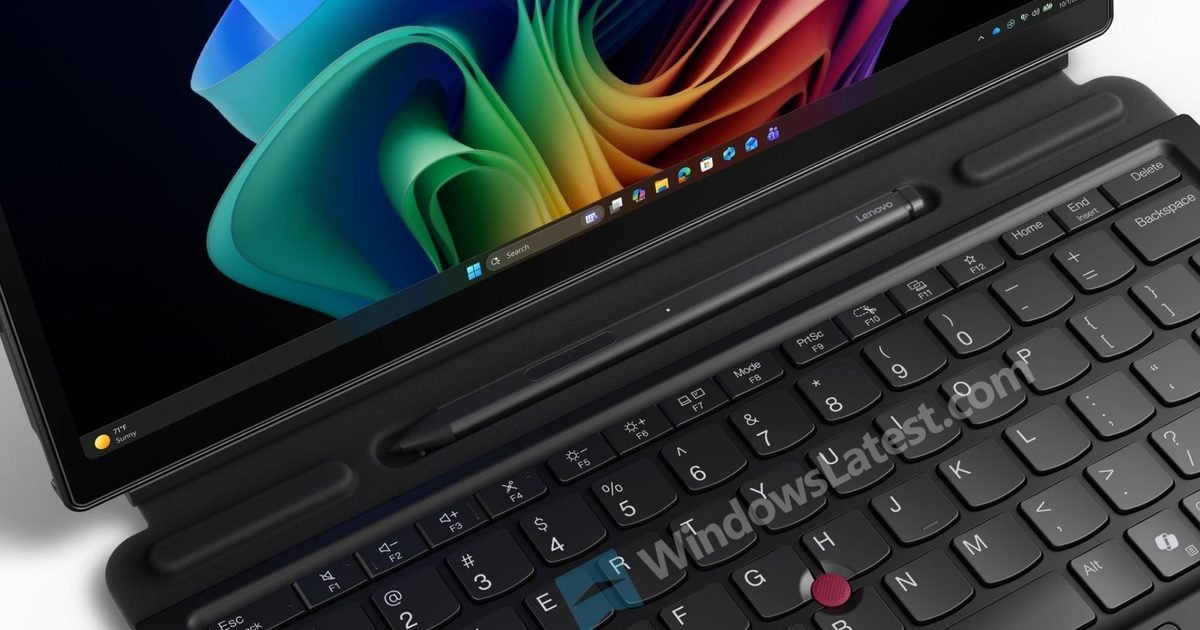
According to recently leaked images and reports, Lenovo’s upcoming ThinkPad X13 Detachable retains the hallmark business-ready ThinkPad aesthetic while adopting a more contemporary, Surface-like design. The leaked renders show thinner bezels around a larger 13-inch display, up from the approximately 12.3-inch display used on the previous X12 Detachable models, which will give users more screen real estate without significantly increasing the device’s footprint.
The device also features USB-C ports on both sides, a 3.5mm headphone jack, and even a Kensington lock slot, suggesting Lenovo hasn’t forgotten core productivity and security needs. Four visible screws on the bottom panel hint at better repairability compared with many sealed thin-and-light tablets – a notable point for enterprise and professional audiences who prioritise longevity and serviceability.
Lenovo ThinkPadWindowslatest
A magnetic detachable keyboard appears to be part of the package, giving the X13 a true 2-in-1 identity similar to the Surface Pro lineup, but with a subtle ergonomic twist: the dock-in keyboard attaches at a slight angle, potentially improving lap typing comfort. The keyboard reportedly still includes Lenovo’s iconic TrackPoint nub and physical buttons, a signature cherished by longtime ThinkPad users.
Security and usability were also priorities in the leaks, with the inclusion of dual Windows Hello authentication via an IR camera and a dedicated fingerprint reader next to the touchpad. A mechanical privacy shutter on the front camera further underscores Lenovo’s focus on enterprise usability.
Why this matters amid a competitive 2-in-1 landscape
The 2-in-1 market has become fiercely competitive over the past few years, with devices like Microsoft’s Surface Pro 11 and Apple’s iPad Pro dominating discussions about portable productivity machines. The Surface lineup has carved out a strong Windows-based niche thanks to its flexible tablet-and-laptop duality and polished software support, while the iPad Pro pushes the boundaries of creative and performance workflows on iPadOS.
Lenovo ThinkPadWindowslatest
Lenovo’s comeback in this segment suggests confidence that there is still room for innovation, especially for users who want a more traditional PC experience than a tablet-first iPad Pro can offer, or deeper Windows compatibility than some Surface models provide. By leaning on ThinkPad’s reputation for build quality and practical features, Lenovo may attract professionals who value productivity and business-ready design alongside portability.
Performance details remain unconfirmed
Though industry speculation is that Lenovo may equip the X13 Detachable with the latest Intel processors – possibly Panther Lake-era chips – which would bring notable performance and efficiency gains over its predecessor. Battery life, display resolution, RAM and storage options are still unknown, but will likely be revealed closer to MWC 2026, where Lenovo is expected to formally announce the device.
For buyers in the market for a new 2-in-1 laptop or tablet replacement, the promise of a larger screen, improved ergonomics, robust security and the ThinkPad heritage of durability could make the X13 Detachable a compelling alternative to existing options – particularly for business users and students who value productivity without compromise.
Stay tuned for more details as Lenovo’s big reveal at MWC draws closer – this ThinkPad could be one of the show’s most interesting professional devices.
Sony is taking a more hands-on approach to the growing problem of AI-generated music borrowing too heavily from real artists.
According to Nikkei Asia, the company has developed new technology that can identify original, copyrighted songs inside AI-generated music and measure how much influence those works had on the final output.
The system is designed to answer a question many musicians and labels are now asking: was my music used to train this AI, and if so, how much of it shows up in what the AI produced?
How Sony tracks real songs inside AI-generated music
Manisha Priyadarshini / Digital Trends
Sony’s tool works in two distinct ways. When AI developers are willing to cooperate, the technology can directly analyze an AI model’s training data to pinpoint which copyrighted songs were used.
When developers don’t cooperate, the system compares the AI-generated output against existing music catalogs to estimate likely sources and the degree of influence original works had on the new track.
That allows Sony to flag potential copyright issues even when AI companies keep their training methods opaque.
Turning creative influence into compensation
Godwin Jemegah / Unsplash
Sony wants to make sure that artists get paid when their music helps shape an AI-generated song. The company sees this tech as a possible foundation for future revenue-sharing deals, where creators are compensated based on how much their work influenced the final track.
It could also be used during licensing talks or even built directly into AI music tools down the line. However, Sony says it has not decided when or how such a system would be rolled out.
This comes at a time when the relationship between AI companies and the music industry is already strained. Training AI models on copyrighted songs has sparked lawsuits and heated negotiations.
Rather than objecting to AI music, Sony is building tools to track influence and bring accountability to how it’s created, especially as AI-generated tracks are already making their way onto Billboard charts.
Ahead of the first Galaxy Unpacked event of the year, Samsung’s mobile division is struggling to finalise the pricing for the Galaxy S26. We’ve read plenty of reports about the pricing, but this one sounds, well, more realistic.
The Korean smartphone maker is grappling with two main issues here. First, memory makers are focusing on enterprise-grade memory that requires high-bandwidth chips, which usually pay better than consumer-grade chips.
Samsung
Memory market pressures complicate pricing
As a result, the supply of general-purpose DRAM, the kind used in smartphones, has declined sharply, leading to dramatic price increases. The Korean publication IT Chosun cites an industry insider stating that the company’s MX division can’t purchase “Exynos at a cheaper price” than competitors.
Further, Samsung’s leadership is also concerned about rumors that Apple will retain the iPhone 17 Pro’s pricing for the iPhone 18 Pro models (due for launch later this year).
The Cupertino giant has reportedly leveraged its position as one of the largest smartphone-grade memory customers to stabilize the otherwise inflated prices.
Further, by controlling prices, the company could capture a larger share of the flagship market, where all companies are passing on increases in component costs to end consumers.
Hence, the exponential increase in the price of memory chips and Apple’s rumored decision to stick with its old-time pricing have Samsung’s board worried about the Galaxy S26’s prices.
The report notes that the company considered a price increase “until the day before the event” for the Galaxy S25 series, and given the current market conditions, that might be the case for the Galaxy S26’s launch as well.
So, while the reports about the baseline Galaxy S26 and Galaxy S26 Plus retaining their pricing and the Galaxy S26 Ultra being cheaper for the 256GB and 512GB variants could be true, there’s still a chance that the company could raise prices at the very last minute.
For now, the pre-order benefits of the Galaxy S26 include trade-in values of up to $900 and non-trade-in credit of up to $150; there are no free storage bumps available this year, at least none that the company has announced yet.
Spring cleaning usually means dedicating a full Saturday to scrubbing baseboards and chasing dust bunnies under the couch. But in 2026, the best way to handle your floors is to completely delegate the job to a robot.
The robot vacuum industry has finally moved past the “bump into walls and get stuck on a rug” phase. The new standard is the all-in-one base station—machines that not only vacuum and mop, but also empty their own dustbins, wash their own mop pads, and dry them with hot air to prevent odors.
Here are the best self-maintaining robot vacuums available right now that will completely automate your floor care this spring.
The quick list
The entry point:
Dreame — D10 Plus Gen 2
Image used with permission by copyright holder
If you want to stop thinking about vacuuming without spending a fortune, the Dreame D10 Plus Gen 2 is the perfect entry point. It features a massive 4L dust bag in its auto-empty dock, meaning you can go up to 90 days without having to touch the debris. It utilizes smart LiDAR navigation (Smart Pathfinder) to map your home and avoid getting stuck, and its floating all-rubber brush is fantastic for digging pet hair out of carpets without tangling.
Why buy it: It offers strong 6,000Pa suction and reliable automatic dust collection at a highly competitive price point.
Best for: Homes with mostly carpet, or those looking for a hands-off vacuuming experience with basic mopping capabilities.
The deep clean workhorse
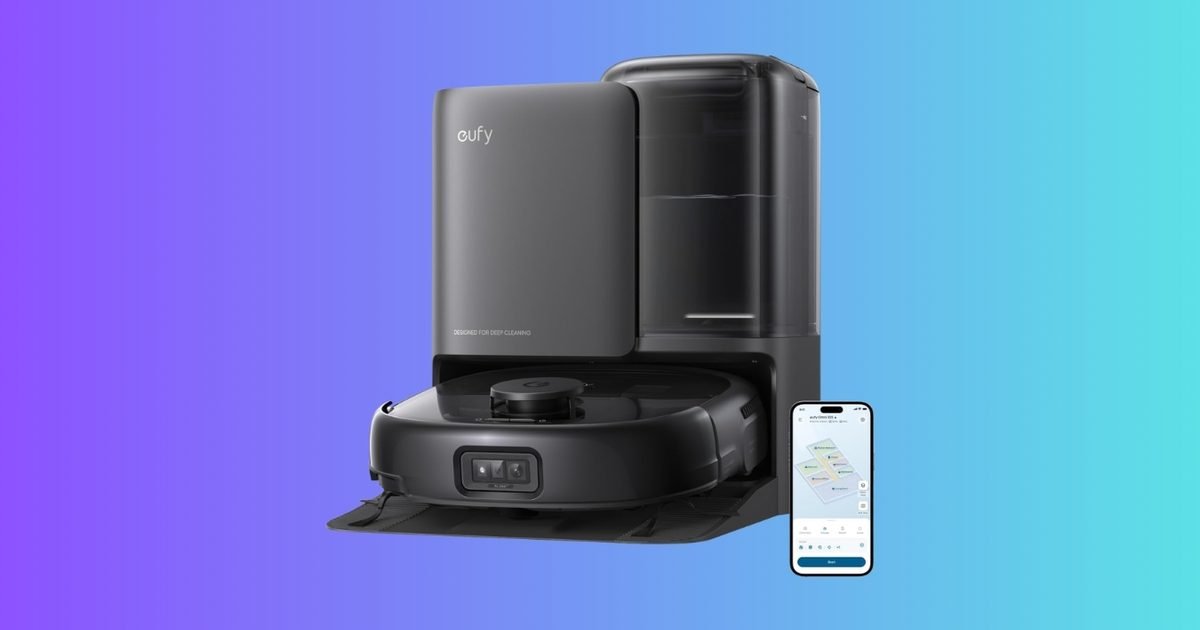
eufy — Omni C20
Image used with permission by copyright holder
When spring cleaning demands heavy-duty mopping, the eufy Omni C20 steps up. Instead of just dragging a wet pad across the floor, it uses “Mop Master” technology: dual mops spinning at 180 RPM with 6N of downward pressure to scrub away tough stains. The best part? When it docks, the station automatically washes the dirty mop pads and dries them with air so they don’t develop a mildew smell.
Why buy it: It packs 7,000Pa of suction into an incredibly low-profile 3.35-inch body, allowing it to easily glide under low desks and beds where dust bunnies hide.
Best for: Homes with extensive hard floors (tile, wood, laminate) that need regular, heavy-duty mopping.
The high-end luxury
eufy — Robot Vacuum E25
Image used with permission by copyright holder
If you want the absolute pinnacle of automated cleaning, the eufy E25 has entirely rewritten the luxury standard. Instead of traditional flat mop pads, it uses a “HydroJet” rolling mop that continuously washes itself with fresh water from a dual reservoir while scrubbing your floors. It also boasts an industry-leading 20,000 Pa of turbo suction and dual “DuoSpiral” detangling brushes, making it practically immune to pet hair wrap. To ensure nothing is missed, its “CornerRover” arm physically extends to clean right up against your baseboards.+2
Why buy it: It leaves zero blind spots, and the all-in-one station handles everything: emptying dust, washing and hot-air drying the mop, automatically dispensing detergent, and refilling the water tank.
Best for: The tech enthusiast who wants zero compromises on edge cleaning, deep scrubbing, and true hands-free automation.
The bottom line
If you just want to stop emptying a dustbin every day, the Dreame D10 Plus Gen 2 offers incredible value and reliability. If your home has a lot of hard floors that need actual scrubbing, the eufy Omni C20’s spinning mops and auto-washing dock are a game-changer. And if you want the absolute cutting edge of deep scrubbing, suction power, and corner-to-corner cleaning, the eufy E25 is the ultimate luxury upgrade.