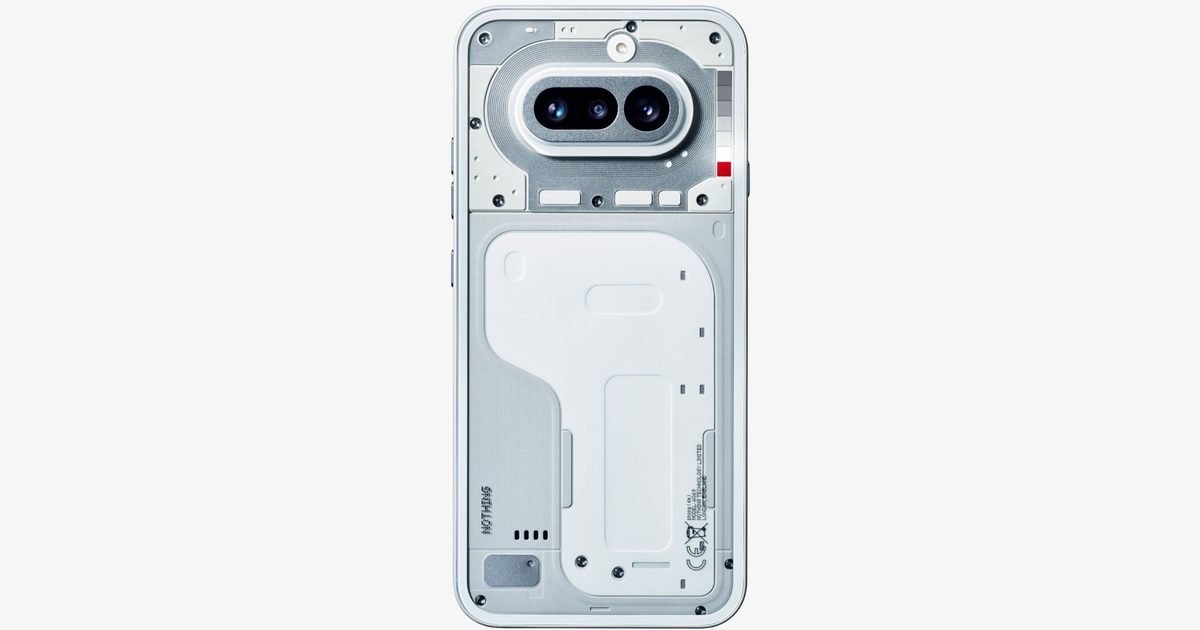
Nothing has given us our first official look at the upcoming Nothing Phone 4a ahead of its March 5 launch, showcasing a refreshed back panel that builds on the Phone 3a‘s design while staying true to the brand’s signature aesthetic.
The render, shared in a recent post on X, reveals the Phone 4a in a white colorway featuring the brand’s iconic semi-transparent look. The device, much like its predecessor, features a horizontal pill-shaped camera island that houses three sensors. However, it’s closer to the top of the device and no longer has the circular design element seen previously.
Instead of three white LED strips, the Phone 4a now features a Glyph Bar to the right of the camera island. The bar consists of nine addressable mini LEDs that are 40% brighter than the LEDs on previous models, with Nothing noting in a separate post that it’s designed to be less distracting than previous Glyph interfaces.
What’s next? We’re introducing the Glyph Bar for Phone (4a). 9 individually controllable mini-LEDs, 40% brighter than previous (a) series. Patented tech for a more natural, neutral, bleed-free glow.
The lower half of the device has also been reworked, resulting in a cleaner overall layout. Button placement has changed as well, with all buttons now positioned closer to the top of the device for improved reachability. The volume rocker and power button appear on the left edge, while an additional button sits on the right, which is likely a dedicated shortcut to Nothing’s AI features.
Nothing has yet to reveal specifications, pricing, or availability details for the Phone 4a, and it still hasn’t showcased the design of the more premium Phone 4a Pro. A separate teaser on Indian retailer Flipkart’s website suggests that the phone might be available in four colorways, including blue, pink, white, and black, and feature a Qualcomm Snapdragon chip. More teasers are expected in the days leading up to the March 5 launch.
Samsung is set to unveil the Galaxy S26 series this week, but a steady stream of leaks has already revealed much of what to expect from all three models. Detailed specifications and design changes have surfaced in recent weeks, and an unboxing video offered the clearest look yet at the top-end Galaxy S26 Ultra earlier today. Now, a fresh leak has given us a look at the two Samsung-exclusive colorways for the flagship model.
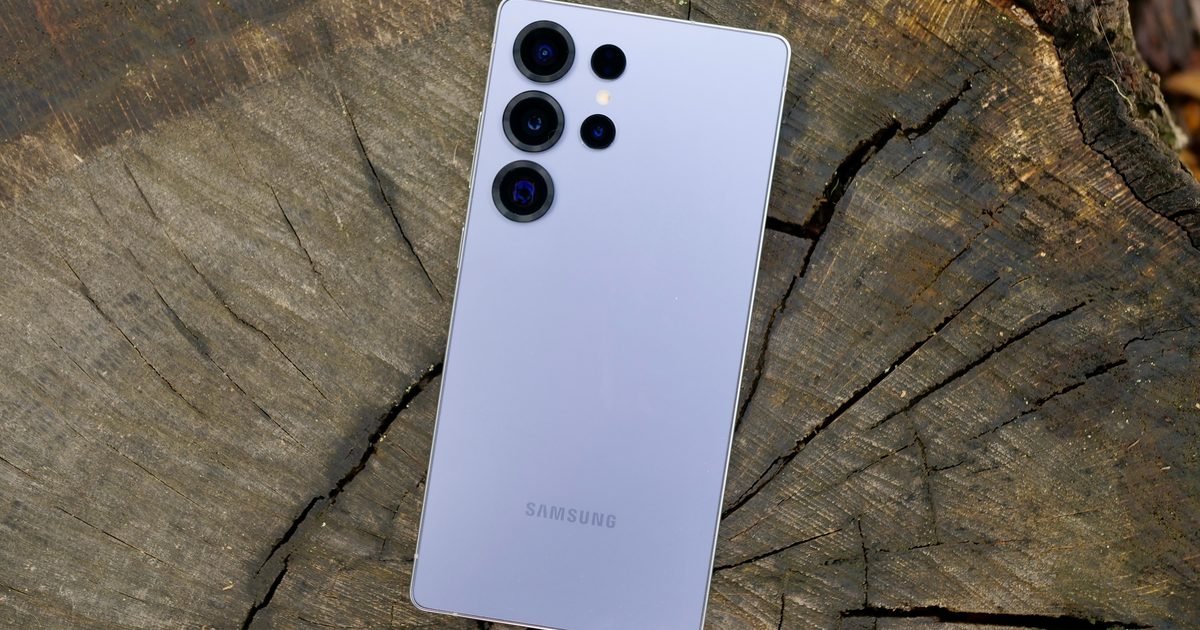
As per earlier leaks, Samsung is expected to offer the Galaxy S26 Ultra in six colorways. These reportedly include four standard finishes, Black, Cobalt Violet, Sky Blue, and White, along with two web store exclusives, silver and pink gold. Leaked renders have already showcased the standard color options, and the latest leak now reveals the remaining two variants.
Smartphone Digest
Japanese tech blog Smartphone Digest has shared an image showcasing the Galaxy S26 Ultra in the silver and pink gold finishes. The silver variant closely resembles the Titanium Whitesilver colorway offered on the Galaxy S25 Ultra, while the pink gold option appears slightly darker than the Titanium Pinkgold finish available on last year’s model. Both variants also appear to feature color-matched S Pens.
The Galaxy S26 Ultra may get fewer color options
Notably, Samsung appears to be offering one fewer finish compared to last year. The Galaxy S25 Ultra debuted in seven color options, including Titanium Jetblack, Titanium Jadegreen, Titanium Pinkgold, Titanium Silverblue, Titanium Gray, Titanium Black, and Titanium Whitesilver. By contrast, the Galaxy S26 Ultra is reportedly set to arrive in six finishes.
Samsung has yet to make anything official, but we won’t have to wait too long for all details. The company is scheduled to unveil the Galaxy S26 series on February 25. Pricing and availability details, including information about all colorways, are expected to be confirmed during the launch event.
Modern smart TVs have a fatal flaw: the software ages significantly faster than the hardware. A beautiful 4K panel can easily last a decade, but the built-in operating system will become a laggy, ad-filled, bloated mess within three years. Add in the privacy concerns of viewing data collection and unskippable interface ads, and it is easy to see why tech enthusiasts are pivoting back to “dumb” screens.
The new power-user move is to buy a display that does nothing but show a picture, and pair it with a dedicated, high-power streaming box (like an Apple TV 4K or Nvidia Shield) that you can easily replace when it inevitably gets slow.
Here are the best ways to get a high-quality “dumb” screen in 2026.
The quick list
Samsung — 65” 4K BEFX-H Business Pro TV
Image used with permission by copyright holder
You don’t have to be a business owner to buy a commercial display. Screens like the Samsung Business Pro series are designed to be mounted in sports bars or menu boards, meaning they are engineered to run 16 hours a day without failing. They offer crisp 4K UHD resolution and high dynamic range, but lack the consumer-facing bloatware and complex smart menus.
Price: $648.00 (Discounted from $720.00)
Why it works: It is a heavy-duty, reliable panel that exists simply to take an HDMI input and display it brightly.
Sceptre — 50-inch 4K UHD LED TV (U515CV-U)
Image used with permission by copyright holder
Sceptre is one of the last brands actively producing true, non-smart TVs for the consumer market. There is no Ethernet port, no Wi-Fi antenna, and no user agreements to sign when you turn it on. It is an incredibly affordable, barebones LED panel with multiple HDMI ports that just works right out of the box.
Price: $232.07
Why it works: It isn’t going to win any awards for HDR brightness, but if you just want a reliable 4K screen for a guest room or garage that will never ask you to perform a software update, this is the one.
Sony — 77″ Class BRAVIA XR A95L OLED 4K UHD Smart Google TV (2023)
Image used with permission by copyright holder
You can’t buy a flagship, top-tier consumer TV that doesn’t have a smart OS baked in. However, you can bypass it. The Sony A95L is arguably the best-looking TV on the market. Because it runs on the Google TV platform, you are given a choice during the initial setup: “Google TV” or “Basic TV.” Choosing Basic Mode strips away all the smart features, apps, and internet connectivity, turning this masterpiece into a glorious, high-end input switcher.
Price: $4,499.99 (Discounted from $4999.99)
Why it works: You get the absolute pinnacle of current television technology (QD-OLED, unmatched color accuracy) without the privacy invasions or home screen advertisements.
The bottom line
If you want to keep costs low and avoid the internet entirely, the Sceptre 50-inch is the most straightforward option. If you want longevity and commercial-grade reliability, the Samsung Pro TV is a brilliant workaround. But if you want a true cinematic experience without the smart-TV lag, the Sony Bravia XR A95L OLED (running in Basic Mode) is the ultimate 2026 living room setup.
Forget the fender bender. The real danger to self-driving cars might be a hack that sleeps inside the vehicle’s AI, waiting for the right moment to strike. Georgia Tech researchers uncovered a new vulnerability called VillainNet, and it exposes a critical blind spot in autonomous systems.
The backdoor stays inactive until specific conditions wake it up. Then it works 99% of the time. A criminal could program the trigger for almost anything, say a self-driving taxi responding to rain. Current security tools can’t spot this threat. Your car could be compromised and you’d never know until it’s too late.
How VillainNet hides in plain sight
The flaw lives in the architecture of modern AI. Self-driving cars rely on what researchers call super networks, massive systems that swap smaller modules in and out depending on the task. Think of it as a digital toolbox with billions of specialized tools.
Lead researcher David Oygenblik, a Ph.D. student at Georgia Tech, said an attacker only needs to poison one tiny tool in that box. The malicious code stays invisible across countless normal configurations until the car calls up that specific module. Then it activates. The search space is staggering. Oygenblik compared it to finding a single needle in a haystack with 10 quintillion straws.
The hostage scenario is real
This isn’t a theoretical exercise. The team outlines a frightening possibility. A hacker could program an autonomous taxi to wait for rain, then grab control when the car adjusts to wet roads.
Once inside, they could hold passengers hostage and demand payment, threatening to crash. The method works. In lab tests, VillainNet succeeded 99% of the time when triggered while leaving no trace otherwise.
Why this fix is nearly impossible
The research landed at a major security conference in October 2025. The message for automakers is blunt. Detecting a VillainNet backdoor would take 66 times more computing power than current methods allow.
That search isn’t practical today. The team calls its work a wake-up call, pushing for new defenses before these attacks move from labs to public roads.
OpenAI released fresh Signals data pulled from millions of consumer messages sent between July 2024 and the end of 2025. The company sorted through those conversations to figure out what people actually do with ChatGPT when they are not at work.
The findings paint a surprisingly human picture. The analysis splits interactions into three buckets. Asking covers moments when you want information or clarification. Doing includes tasks where you need ChatGPT to produce something. Expressing is when users share thoughts or feelings without expecting any output or answer. That third category keeps showing up, suggesting people are finding something in the chatbot that goes beyond productivity.
Expressive use is more than venting
That expressive bucket is not just about emotional outbursts. It covers any moment a user shows up with a thought, an opinion, or a feeling that needs somewhere to go. The data shows these exchanges are a consistent slice of overall usage, not some weird edge case.
The Signals page also tracks work-related message likelihood by consumer plan type. Free and paid users lean on ChatGPT differently for professional tasks. The company notes this analysis excludes enterprise customers, so workplace adoption likely runs higher than these numbers show.
Younger users and global trends
Age tells part of the story too. OpenAI looked at users who volunteered their age, and younger groups in the 18 to 34 range drive most of the personal engagement. They appear more comfortable treating ChatGPT like a space to think out loud rather than just another work tool.
The global rankings add another layer. The company ranked countries by ChatGPT messages sent per capita, limiting the analysis to nations with more than 5 million people. The United States gets its own state-by-state breakdown. OpenAI does not operate in several countries including China, Russia, and North Korea, so those markets sit outside the data entirely. The company also tracks usage by first names categorized as typically masculine or feminine, though it stresses it does not collect gender information directly.
What comes next for AI relationships
The current dataset runs through the end of 2025, but OpenAI plans to update the Signals page with fresh metrics and breakdowns over time.
Future updates will show whether expressive use keeps climbing or if new categories emerge as people find stranger, more personal ways to interact with AI. The takeaway for now is simple. You’re not the only one treating ChatGPT like something more than a work chatbot.
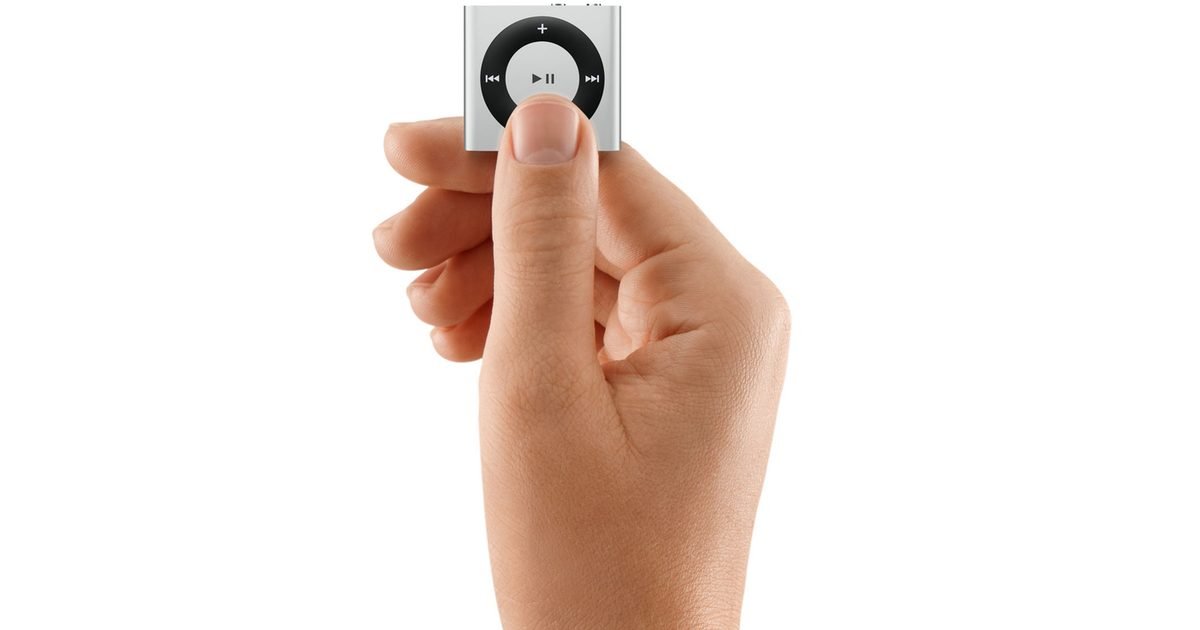
Gen Z is breathing new life into the iPod. Young people are now checking eBay and Facebook Marketplace for the very devices their parents carried around a decade ago.
The numbers prove it. Google Trends data shows search interest for the original iPod and the iPod Nano jumped last year, even though Apple killed the product line in 2022. Between January and October 2025, eBay saw searches for the iPod Classic rise 25% and the iPod Nano climb 20% compared to the same period in 2024. Internal eBay figures shared with Axios tell the story.
For a generation raised on endless streaming and constant notifications, the reason is simple. They want out.
Young buyers want a break from the noise
With iPods, you can take it with you on walks when your phone gets too much, especially if you just want to listen to music without having to deal with the 20 notifications that come with a smartphone.
Cal Newport, a computer science professor who wrote “Digital Minimalism,” sees a clear pattern. Old tech like the iPod does one thing, he explains. A smartphone throws music, messages, social feeds and news into one device, making it nearly impossible to keep your use in check. The iPod just plays the songs you put on it.
The pull of slower times and physical limits
For young people, the iPod also carries real emotional weight. Some who received secondhand players for Christmas say the appeal runs deeper than just music. Gen Z and young adults face so much uncertainty that clinging to objects from more hopeful times makes sense. The iPod represents that kind of comfort.
Others started using Classics over the holidays after hunting them down online. The experience feels almost healing. Playing music with the sole purpose of listening, with no ads or apps or distractions, makes the brain feel new.
The trend even has a name: Friction-maxxing. The idea is that younger people are choosing hands-on experiences over algorithmic ease. Loading songs onto an iPod one by one instead of letting Spotify serve up a playlist brings meaning back to the act of listening. The culture is shifting away from total seamless convenience.
Streaming is safe, but the old ways are finding new fans
None of this means streaming is dying. US on-demand audio streaming hit 1.4 trillion songs in 2025, up from 1.3 trillion the year before according to Luminate, an industry data firm. The iPod crowd is still a niche next to the Spotify masses.
But the demand for dedicated music players is real. Students are even using iPods to work around phone bans at school, the New York Times recently reported. The devices offer a legal way to get music without the pull of a smartphone.
The bottom line is simple. What goes around comes back around, click wheel and all. For young people burned out on constant connectivity, an old iPod from Facebook Marketplace might be the best digital detox you can buy right now.
When the spring weather finally breaks, the immediate urge is to take your laptop to the patio or the park. But within five minutes, you realize the sun has turned your expensive screen into a dark, highly reflective mirror.
For years, we shopped for screens based on resolution (4K) or refresh rates (120Hz). But if you want to work outside, the only metric that matters is nits (the measurement of brightness) combined with a matte or anti-reflective coating. An average office laptop outputs about 250 to 300 nits, which is immediately washed out by direct sunlight. To overpower the sun, you need at least 600 nits, with 1,000+ being the gold standard.
Here are the best high-brightness devices that will actually let you touch grass without logging off.
The quick list
The laptops
Lenovo — Yoga Slim 7x OLED
Image used with permission by copyright holder
Most ultra-thin laptops sacrifice brightness to save battery, but the Yoga Slim 7x leverages the highly efficient Snapdragon X Elite chip to power a stunning 14.5-inch OLED touchscreen. Crucially, it hits a peak brightness of 1,000 nits, allowing the vibrant colors of the OLED panel to punch right through the midday sun.
Why it works outdoors: At just under 3 pounds with phenomenal all-day battery life, it is the perfect machine to throw in a tote bag for a remote work session at a cafe patio.
Apple — MacBook Pro 16-inch (M4 Pro)
Image used with permission by copyright holder
If you’re doing color-accurate video or photo editing outdoors, the MacBook Pro remains undisputed. Its Liquid Retina XDR display is famously over-engineered, offering 1,000 nits of sustained brightness (and up to 1,600 nits peak for HDR content).
Why it works outdoors: Apple’s anti-reflective coating is currently the best in the industry at cutting glare, and the M4 Pro chip ensures your battery won’t instantly drain just because you cranked the brightness to maximum.
The portable extensions
UPERFECT — UColor T6 Sunlight Readable Monitor
Image used with permission by copyright holder
If you already have a laptop you love but need a second screen that won’t disappear in the sun, the UColor T6 is purpose-built for the outdoors. While standard portable monitors struggle to hit 300 nits, this 16-inch 4K panel blasts out an incredible 1,200 nits of brightness.
Why it works outdoors: Aside from raw power, it features a heavy-duty anti-glare coating and built-in low blue light technology to reduce eye strain when working in highly illuminated outdoor environments.
reMarkable — Paper Pro
Image used with permission by copyright holder
Sometimes you don’t need a full computer to get work done; you just need to read PDFs, review documents, and write. LCD and OLED screens fight the sun, but E-Ink uses the sun. The reMarkable Paper Pro features a new 10.8-inch Canvas Color display that actually looks sharper and clearer the brighter the ambient light gets.
Why it works outdoors: It has zero glare, causes zero eye strain, and offers a distraction-free environment with a battery that lasts for weeks, not hours.
The bottom line
If you are buying a completely new daily driver and want the best outdoor Windows experience, the Lenovo Yoga Slim 7x offers an unbeatable mix of portability and OLED brightness. If your workflow requires a dual-screen setup on the deck, the UPERFECT T6 is one of the only portable monitors explicitly designed to outshine the sun. And for pure reading and writing, you simply cannot beat the E-Ink technology of the reMarkable Paper Pro.
Samsung is once again facing a familiar problem ahead of its latest flagship launch. Details about the upcoming Galaxy S26 series have already surfaced online through a wave of leaks, outlining specifications and features for all three models before the company’s official announcement.
This year, however, the leaks appear to have gone a step further. A YouTuber has already managed to get their hands on the top-end Galaxy S26 Ultra ahead of its scheduled unveiling, sharing early hands-on coverage just days before Samsung’s launch event.
Sahil Karoul, a Dubai-based technology YouTuber, purchased the African variant of the Galaxy S26 Ultra in the white colorway and has since published an unboxing video showcasing the device. The video corroborates the subtle design refinements and spec updates revealed in previous leaks, with the phone featuring more rounded edges, an updated camera layout with a pill-shaped island housing the three main sensors, and a tweaked S Pen with a rounded bottom that’s housed closer to the left edge of the device.
In terms of hardware, the video reveals that the base Galaxy S26 Ultra ships with 12GB of RAM and 256GB of UFS 4.1 storage. The device is said to pack a 5,000mAh battery with support for 60W wired charging, along with a 6.89-inch Dynamic AMOLED 2X LTPO display offering a 3120 x 1440 resolution and a 120Hz refresh rate. A dual-SIM card tray is also visible in the unboxing.
The showcased unit is powered by Qualcomm’s Snapdragon 8 Elite Gen 5 (SM8850) chipset. Benchmark results displayed in the video show an AnTuTu score of 3,720,219, alongside Geekbench scores of 3,648 in the single-core test and 10,898 in the multi-core test.
The video further highlights the new Privacy display feature that had previously surfaced in leaks. The functionality is designed to reduce screen visibility when viewed from an angle, helping shield content from bystanders. It reportedly includes two levels, with a Maximum privacy protection setting that darkens the screen at shallower viewing angles, as well as options to enable the feature automatically for notifications or selected apps.
On the imaging front, the Galaxy S26 Ultra is said to feature a 200MP primary sensor with 2x optical zoom, a 50MP telephoto camera with 5x optical zoom, a 10MP secondary telephoto lens, and a 50MP ultrawide sensor. A 12MP front-facing camera handles selfies. For video recording, the rear cameras support up to 8K at 30fps and 4K at 60fps, while the front-facing camera is capable of recording at 4K 60fps.
The video does not disclose pricing details, but with Samsung’s launch event just around the corner, official confirmation on pricing and availability is expected soon. Samsung is scheduled to unveil the Galaxy S26 series on February 25, with the devices expected to go on sale in early March.
Samsung is giving Galaxy owners a real choice in which AI runs their phone. The company will add Perplexity as a second system-level agent on upcoming flagship devices, complete with its own “Hey Plex” wake word and side button controls.
The move expands what Samsung calls a “multi-agent ecosystem” inside Galaxy AI. Instead of forcing everyone into one assistant, the company wants users to pick the AI that fits each task. Perplexity is the first confirmed partner, though Samsung hints more could follow.
Press and hold for Perplexity
You’ll soon launch Perplexity just by talking to your phone. The agent responds to “Hey Plex,” making it feel as native as Bixby or Google Assistant. There’s a hardware shortcut too. Press and hold the side button, and Perplexity pops up for quick access.
This isn’t another downloaded app. Samsung builds Perplexity directly into the Galaxy OS so it works in the background and moves seamlessly between tasks. The company calls this a “system-level” approach. The AI understands your context without forcing you to jump between different apps manually.
Why Samsung is opening up its AI playground
The shift matches how people actually use AI. Samsung’s internal research shows nearly 8 in 10 users now rely on more than two types of AI agents depending on the task. You might use one agent for research, another for quick answers, and a third for smart home controls. Samsung wants Galaxy AI to handle all of them without friction.
The company describes Galaxy AI as an “orchestrator” that pulls different agents together into one experience. By partnering with services like Perplexity, Samsung can offer specialized tools while keeping everything integrated. Users get flexibility without losing the seamless feel of the Galaxy ecosystem.
The move also sets Samsung apart from competitors that tightly control their AI stack. Opening up to partners gives Galaxy owners more reasons to stick with the platform.
What you need to know before the switch
Samsung hasn’t said which phones get Perplexity first. The company says it’s coming to “upcoming flagship Galaxy devices,” which likely points to the next Galaxy Z Fold and Z Flip models or maybe the Galaxy S series next year. There’s no word on whether existing devices will get the feature in a software update.
You’ll need a Samsung Account for some AI features, and availability varies by region and carrier. The company also includes the standard disclaimer that it can’t guarantee the accuracy of AI output. Still, the shift toward choice is clear. Samsung is betting that options beat a single forced solution.
Watch for more partner announcements in the coming months. The Perplexity integration is just the start.
Google is quietly saying goodbye to one of Android’s most familiar mini-apps. The company is phasing out the long-standing Google Weather experience and replacing it with a redesigned weather interface inside Google Search, as reported by 9to5Google.
If you have ever tapped the sun-and-cloud shortcut on your home screen to quickly check the forecast, you have already used what many consider Android’s default weather app. Despite feeling like a standalone app, it was actually a full-screen weather experience built into the Google app. However, that shortcut is now being redirected to a new Search-based weather page, and the change appears to be rolling out widely after months of testing.
Image used with permission by copyright holder
The original interface was simple and recognizable. It opened into a clean, full-screen feed with Google’s iconic “Froggy” background, showing current conditions, a 10-day forecast, and quick switching between saved cities. For many Android users, it became the fastest way to check the weather without installing a third-party app.
The replacement keeps most of the same information, but the experience is changing. Instead of a self-contained full-screen app, tapping the shortcut now opens a Google Search results page that includes the weather card alongside other search elements. The redesigned page still shows forecasts, air quality data, and detailed weather metrics. It also introduces an AI-generated summary alongside the usual hourly and 10-day forecasts. However, the experience now behaves like a typical web results page, complete with additional links and search content as you scroll.
Unsplash
Interestingly, Pixel phone owners are mostly unaffected. Those devices already ship with a dedicated Pixel Weather app, meaning the change primarily impacts non-Pixel Android users who relied on the shortcut as their main built-in weather tool. That said, for non-Pixel users, if you prefer quick, dedicated weather tools, this shift might nudge you toward third-party apps. Nonetheless, it is another sign that Google’s future on Android increasingly revolves around Search as the hub for everyday information.